My mom has worked from home for the past 8 or 9 years, and I don't know how she does it. I've been finding it challenging getting into a work routine when I don't have my daily bike commute and a desk that's surrounded by other people who are also working. Thankfully R has an extra room, and he was able to clear some space for me on the desk, so I have something like an office that's in a slightly different space than our living quarters.
Yesterday I started what I hope will become my new routine. Most days I have a large number of files to upload and/or download from my work server. This morning I had a submission to upload to an FTP site, so I set the upload going, then put on my shoes and went for a walk. I was only gone for about 30 minutes, but it was so nice to be outside, and made getting to work a little easier.
At lunch, rather than making myself a quick sandwich and heading back to my desk, I ate at the kitchen table. I also did the dishes from last night and did some laundry. Again, following a little break, it was easier to get back to work after lunch.
Showing posts with label work. Show all posts
Showing posts with label work. Show all posts
Wednesday, September 18, 2013

Tuesday, January 17, 2012
Reducing Waste at Work
I work for an engineering consulting firm. If you've seen office space or read Dilbert, you've got a pretty good idea of what I deal with on a daily basis. The company I work for is pretty good about being environmentally conscious. Most of the company's buildings are either LEED Certified, or are in the process of certifying, we report our Carbon Footprint yearly, are pursuing ISO 14000 certification (boring reading, if you're interested), and have a yearly commuter challenge. We can sign up to have our pay stubs electronically through e-post, rather than by mail, which of course I did!
At an office level, the printers are automatically set up to print on both sides, there is a bin in the main kitchen for compost and recycling in addition to garbage. There's also a lot of ceramic mugs, plates, and for everyone to use. And so long as there isn't a lunch 'n' learn going on, there's usually cutlery as well! Our office usually does pretty well in the commuter challenge, and could easily do better if people would participate. (I'm a joiner, always have been!) Not surprisingly, there are things that I'd like to add, like a compost/recycling program for the paper towels in the bathroom, but all in all, it's not bad.
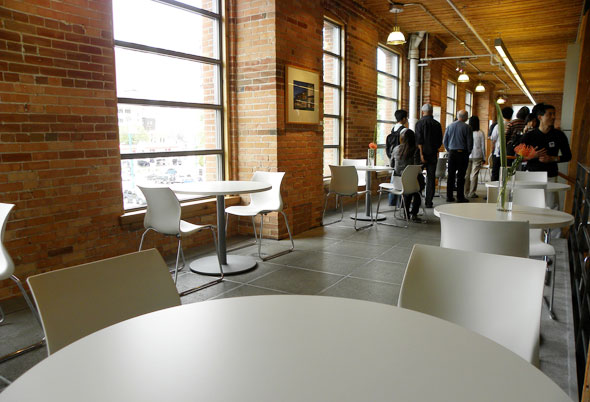
It's also a really cool looking office, it was converted from the old McGreggor Sock Factory. Check it out!

I've also made some personal changes at work to try and reduce the amount of waste that I personally produce. A lot of my job involves comparing something to a code or standard, like the LEED Reference Guide or ASHRAE Standard. Or both, on a good day! I requested (and got) a second screen so that I could avoid having to print those codes and standards. I also put a 'references' toolbar on the menu bar for the codes and standards I use the most so they're as easy to access as the binders I used to keep them in.
I also added a 'projects' toolbar to access my project folders so that I don't have to keep project binders. My old boss loved to have project binders. So much so that he would print everything, including emails, and store them in the project binder. And I work in the 'Sustainable Buildings' group... It drove me crazy!!! I have since filed most the relevant documents and recycled most of the rest. I did keep a few binders for active projects as a test to see if I use them in the next 3 months. If I don't, they're all going to be filed, and I will no longer keep paper copies of anything!
I keep single sided prints, both mine (when I have an odd size of pages to print) and the ones I see in the recycling box in the printing room, and keep them as scratch pads. I know our Ottawa office keeps ALL single sided prints and every once in a while someone makes scratch pads for anyone in the office who wants one. My goal for this year is to start a similar program.
I keep a 750mL glass bottle at my desk for water. Having it there reminds me to drink the 8 glasses I should be drinking in a day. I also have a personal mug for my coffee and tea, and I brought one of my extra hankies to work to cover up food I put in the microwave rather than a paper towel.
I use One Note to record my phone calls and teleconferences, rather than keeping them in a notebook. They're much easier to search through, if needed, and there's obviously far less waste. My next challenge will be to try to do this in real meetings. I'm not a big fan of laptops in meetings because it feels like they put up a barrier between the user and the rest of the group, so I'm thinking about requesting a tablet for taking notes. I've only ever used one for games, so I don't know if it's a viable option, but I can't think of any other. The key will be to remember to turn it off when it's not in use!
Lastly, I got a power bar that has an on-off button and plugged all of my electronics to that. That way my monitor, computer, desk lamp and cell phone charger are not drawing phantom power while I'm not even there.
At an office level, the printers are automatically set up to print on both sides, there is a bin in the main kitchen for compost and recycling in addition to garbage. There's also a lot of ceramic mugs, plates, and for everyone to use. And so long as there isn't a lunch 'n' learn going on, there's usually cutlery as well! Our office usually does pretty well in the commuter challenge, and could easily do better if people would participate. (I'm a joiner, always have been!) Not surprisingly, there are things that I'd like to add, like a compost/recycling program for the paper towels in the bathroom, but all in all, it's not bad.
It's also a really cool looking office, it was converted from the old McGreggor Sock Factory. Check it out!

I've also made some personal changes at work to try and reduce the amount of waste that I personally produce. A lot of my job involves comparing something to a code or standard, like the LEED Reference Guide or ASHRAE Standard. Or both, on a good day! I requested (and got) a second screen so that I could avoid having to print those codes and standards. I also put a 'references' toolbar on the menu bar for the codes and standards I use the most so they're as easy to access as the binders I used to keep them in.
I also added a 'projects' toolbar to access my project folders so that I don't have to keep project binders. My old boss loved to have project binders. So much so that he would print everything, including emails, and store them in the project binder. And I work in the 'Sustainable Buildings' group... It drove me crazy!!! I have since filed most the relevant documents and recycled most of the rest. I did keep a few binders for active projects as a test to see if I use them in the next 3 months. If I don't, they're all going to be filed, and I will no longer keep paper copies of anything!
I keep single sided prints, both mine (when I have an odd size of pages to print) and the ones I see in the recycling box in the printing room, and keep them as scratch pads. I know our Ottawa office keeps ALL single sided prints and every once in a while someone makes scratch pads for anyone in the office who wants one. My goal for this year is to start a similar program.
I keep a 750mL glass bottle at my desk for water. Having it there reminds me to drink the 8 glasses I should be drinking in a day. I also have a personal mug for my coffee and tea, and I brought one of my extra hankies to work to cover up food I put in the microwave rather than a paper towel.
I use One Note to record my phone calls and teleconferences, rather than keeping them in a notebook. They're much easier to search through, if needed, and there's obviously far less waste. My next challenge will be to try to do this in real meetings. I'm not a big fan of laptops in meetings because it feels like they put up a barrier between the user and the rest of the group, so I'm thinking about requesting a tablet for taking notes. I've only ever used one for games, so I don't know if it's a viable option, but I can't think of any other. The key will be to remember to turn it off when it's not in use!
Lastly, I got a power bar that has an on-off button and plugged all of my electronics to that. That way my monitor, computer, desk lamp and cell phone charger are not drawing phantom power while I'm not even there.
Subscribe to:
Posts (Atom)